A live 3D board
Generated from the datasheet: every pin is clickable and shows its functions, warnings and live level. Wires glow when the bus talks.
BoardPilot guides you through embedded work on a real board. Every pin, wire and bus transaction is visible in 3D, and every answer shows where it came from.
Free for 30 days · macOS 12 or newer · Works without a board in simulator mode
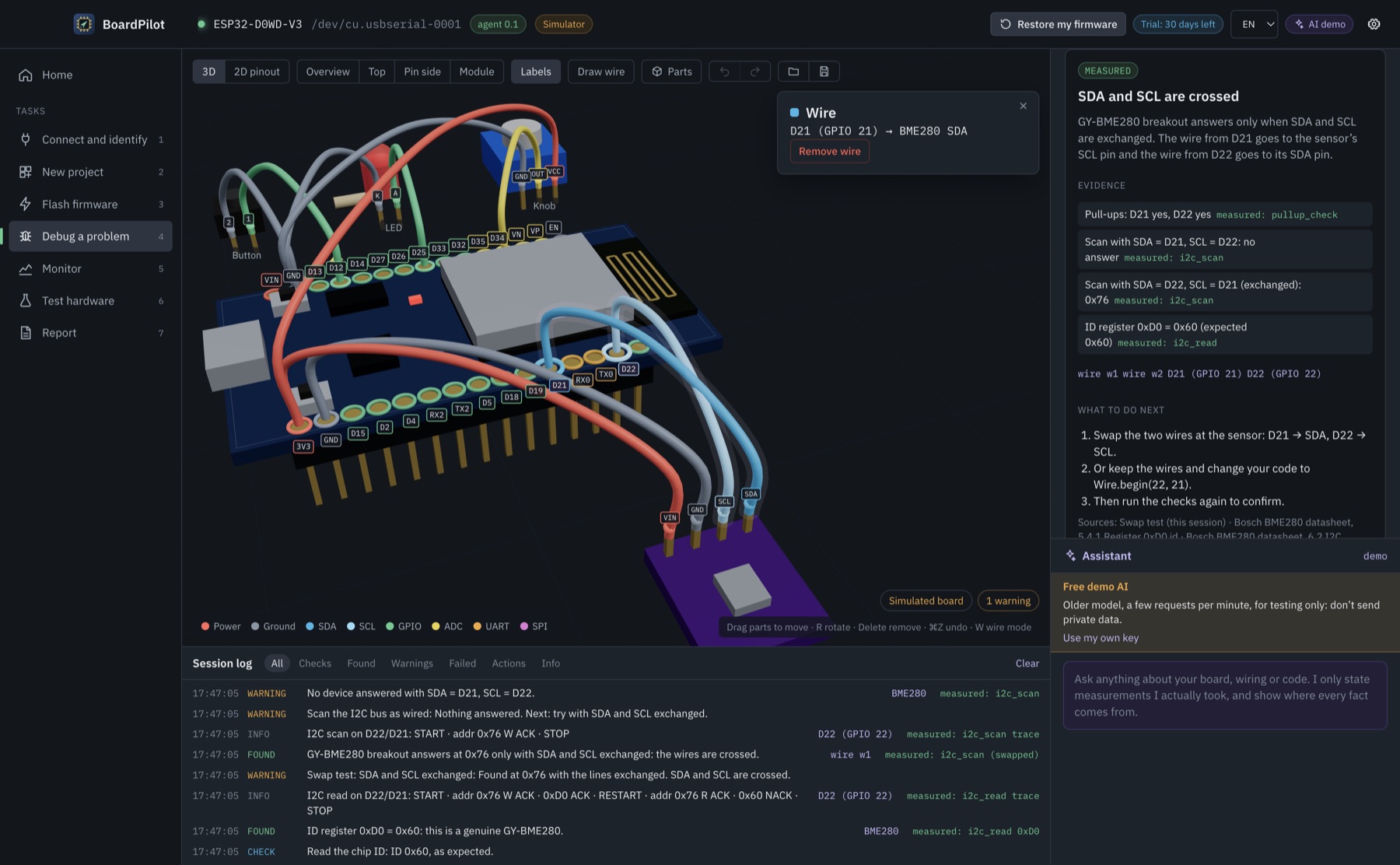
Generated from the datasheet: every pin is clickable and shows its functions, warnings and live level. Wires glow when the bus talks.
Pull-ups, bus scan, the SDA/SCL swap test, chip ID: the app checks it step by step and tells you the cause, with evidence.
See start, address, ACK and data bits under the waveform. Plot sensor values and memory while your own firmware runs.
Add sensors, displays and buttons, move and rotate them in 3D. Paste a product link and BoardPilot drafts the part and its 3D model for you to check.
Flash pins, input-only pins, strapping pins, 5 V on a 3.3 V part, crossed buses, missing ground: flagged on the pin, before you power up.
Optional AI that only states what it measured, labels guesses as suggestions and cites the datasheet section for everything else.
The debug wizard found SDA and SCL crossed at the sensor, and shows which wires to swap.
BoardPilot finds the port, reads the chip, flash size and MAC. No port? It walks you through cable, driver and BOOT-button fixes.
Connect, new project, flash, debug, monitor, test, report. Or just describe the problem in your own words.
Every result lists what was measured, what the datasheet says, and what to do next. One click writes a report to share.
BoardPilot is read-only by default. Anything that writes to the board needs your explicit confirmation, and it backs up your firmware first.
BoardPilot is source-available: the code is public on GitHub so you can read it, build it and contribute. Use after the trial needs a license key.
It is source-available. All the code is public on GitHub under the BoardPilot License: you can read, study, modify and build it. Using it after the 30-day trial needs a license key. The firmware (diagnostic agent and BoardPilotProbe library) is MIT licensed.
Today: the ESP32 DevKit with 30 pins (ESP32-WROOM-32). Boards are data files, so ESP32-S3 and STM32 with ST-Link are next.
The early builds are not signed by Apple yet. Right-click BoardPilot in Applications and choose Open, or go to System Settings → Privacy & Security and click Open Anyway.
No. Simulator mode runs the whole app with a virtual board and realistic faults: crossed wires, a fake BME280, brownouts, wrong baud rate.
No. Checks, measurements and the simulator work offline. The AI assistant is optional and uses your own Anthropic API key.
Only when you confirm: a small diagnostic agent that lets the app read pins and run bus tests. Your program is backed up first and comes back with one click.